In digital marketing, understanding user behaviour and the paths users take to convert is extremely important. Google Analytics (GA) has long been one of digital marketers’ most trusted tools. With the launch of GA4, we have gained a range of new features, including updates to how assisted conversions work. This post explains what assisted conversions are, how to analyse them in GA4, and when to use them.
What are assisted conversions?
Assisted conversions are the channels that helped bring about a conversion before the final conversion happened. Think of an assist in basketball: the assisting player passes the ball to the player who shoots and scores. A channel with assisted conversions is like the assisting player, indirectly helping the team score that point. Assisted conversions help you see which channels customers went through before completing a conversion, such as a purchase. For example, a user first visits your website through a search ad, then visits again through social media, and finally completes a purchase through email marketing. In this case, both the search ad and social media count as assisted conversions. So how do you know which channels are assisting conversions, and what share of conversions they assist? The sections below explain how to analyse assisted conversion data using GA4 reports.
Where to find assisted conversions in GA4
After moving from GA3 to GA4, users often can’t find where assisted conversion data sits in the reports. In GA4, assisted conversion data is actually tucked away in the Model comparison report. The report path is Advertising Attribution Model comparison. Most users struggle to find it because, unlike in GA3, GA4 does not show an “assisted conversions” metric directly. Instead, the report compares data from two attribution models: “last click” and “data-driven attribution (DDA)”.

Last click attribution
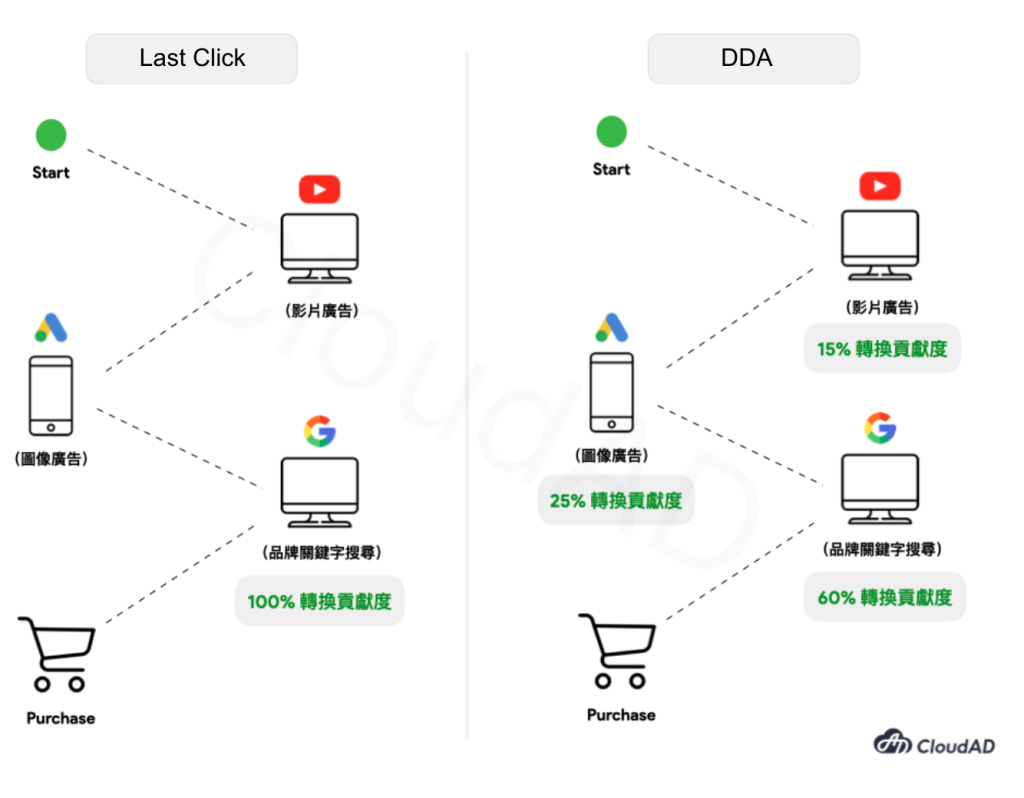
Last click attribution in GA4 is an analysis and attribution method that gives credit for a conversion or transaction to the ad or source of the user’s last interaction. Compared with other attribution models (such as first interaction or time decay), the last click model only considers the user’s final interaction before converting, not their whole interaction path. For example, if a user first clicks a video ad, then a few days later clicks a display ad, and finally completes a purchase through a search ad, the last click model gives all the credit for that purchase to the search ad.
Data-driven attribution (DDA)
Data-driven attribution (DDA) in GA4 uses machine learning to analyse users’ interaction paths and assign conversion value to each touchpoint more accurately. Unlike traditional attribution models with fixed ratios, the DDA model assesses each touchpoint’s real contribution to the final conversion. By analysing a large volume of conversion path data, DDA can identify which ads, sources or channels have the most influence in the conversion process, and assign value according to that influence. This approach takes complex, multi-touchpoint user journeys into account and gives a more complete and objective view of conversion attribution, helping marketers evaluate their campaigns more precisely. So in the same scenario, although the user converted through a keyword search, the system also takes into account the channels the user passed through earlier, and assigns shares of credit based on the data.
How to analyse assisted conversions
When you look at the Model comparison report, you will see the same metrics for both last click and DDA. Why compare metrics from two different attribution models side by side? As the chart below shows, if a traffic channel receives more credit under last click and the percentage change is negative, a higher share of users converted at the end of their journey through this channel. You could call it a “closing” channel.
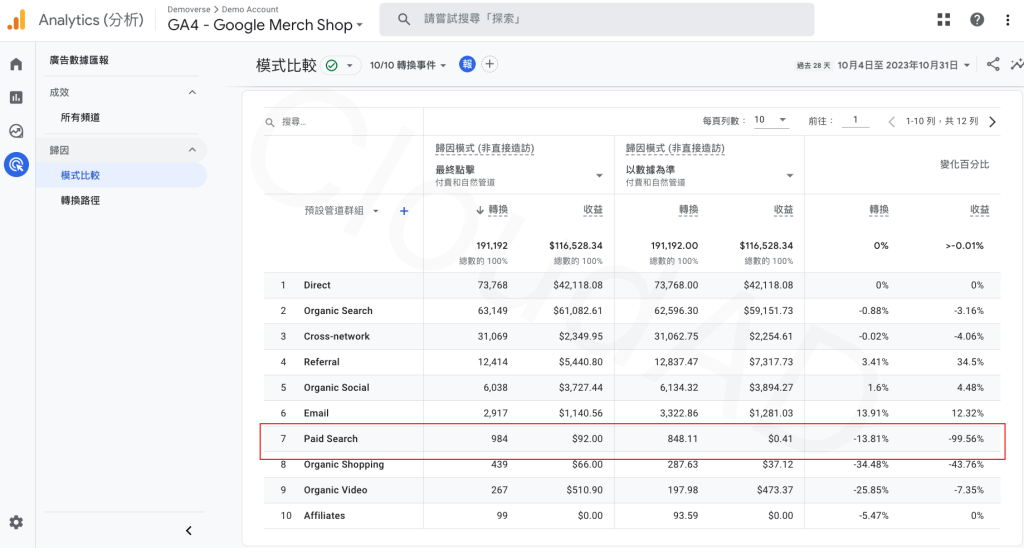
If a channel receives more credit for touchpoints other than the last one (credit assigned by DDA), and the percentage change is positive, this channel leans more towards being an assisting channel.
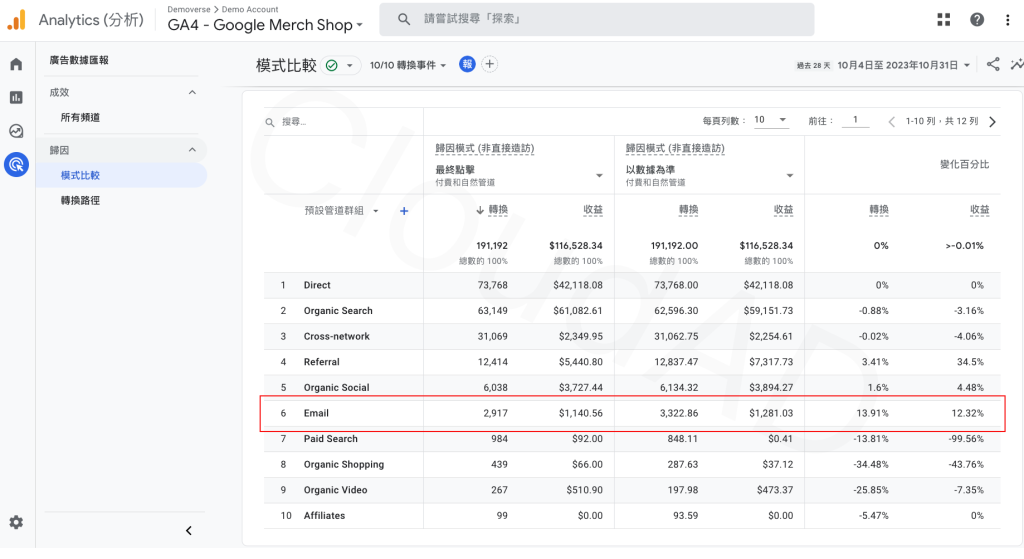
So how do you find each channel’s assisted conversion figures? In the percentage change column, wherever conversions and revenue are positive, those values represent “assisted conversions” and “assisted conversion value”.

You can also switch this report to a different primary dimension. For example, switch to “Source / medium” to see more detailed channel data.

Conclusion
Understanding assisted conversions helps marketers analyse more deeply the role each source channel plays in their campaigns, so they can optimise their marketing strategy and make the best use of their resources. With GA4, we now have more attribution tools and features for digging into this valuable data and building more successful digital marketing strategies. This post has explained how to analyse assisted conversion data in GA4 and how different attribution models assign credit. If you still have questions about interpreting your data, get in touch.