Besides its default automatically collected events, GA4 offers Enhanced measurement events, which help brands measure how visitors interact with website content using more events and parameters. In this post CloudAD introduces the video engagement events, which help brands capture engagement with YouTube videos embedded on their website and understand how those videos perform.
Video engagement
Enhanced measurement events track additional visitor interactions with the website, including page views, scrolls, outbound clicks, site search, video engagement and file downloads. When JS API support is enabled, the video engagement events record the details of how visitors watch YouTube videos embedded on the website. The video engagement events are:
- video_start: when the video starts playing
- video_progress: when playback passes 10%, 25%, 50% and 75% of the video’s length
- video_complete: when the video finishes playing
The related parameters are:
- video_current_time
- video_duration
- video_percent
- video_provider
- video_title
- video_url
- visible (boolean)
For example, if a brand wants to see how far into a video people watch, it can create a custom dimension from video_percent.
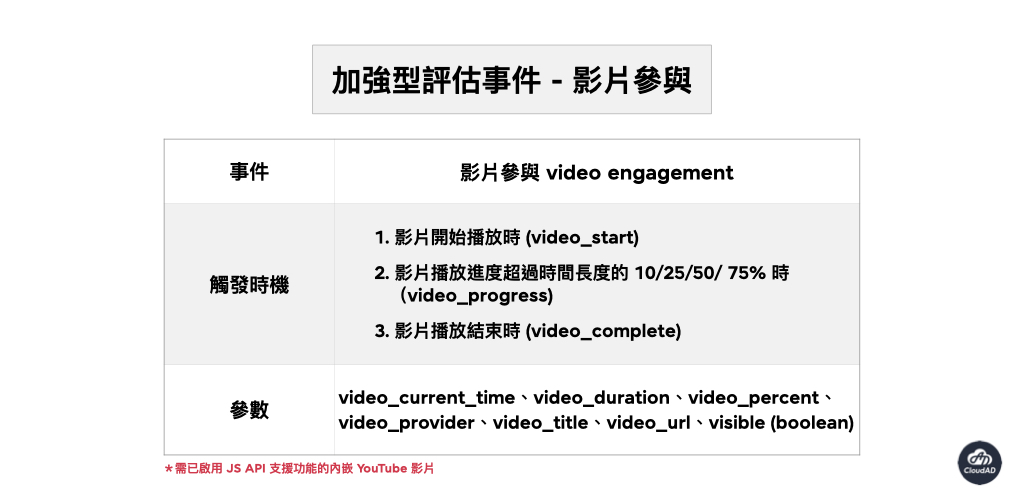
Also, if GA4 Enhanced measurement is enabled but you still cannot capture YouTube video engagement data, try adding “?enablejsapi=1” to the URL of the embedded YouTube video. You can then track engagement easily.

The video engagement events in GA4 Enhanced measurement give brands information on how visitors engage with YouTube videos embedded on their website, so they can understand how the videos are watched and improve their website and video content. If you have any needs or questions about GA4 implementation or data analysis, get in touch.