
In an earlier post we covered three ways to export data from Universal Analytics (referred to below as UA). Once exported, UA data can be turned into a marketer-friendly dashboard so that future planning is driven by data. This post looks at historical UA and GA4 data: what to keep in mind when using them together for insights, so your brand gets strong, data-driven direction.
How should UA and GA4 data be read together?
Since UA stopped collecting data in July last year, most people have moved to the new GA4 platform. For UA users, the challenge is not only getting used to GA4’s new logic, but also working out how to use the UA data they spent so much building up. The UA interface will be shut down completely in mid-2024, and UA data is analysed differently from GA4 data.
Below are some of the key differences between UA and GA4 when interpreting data:
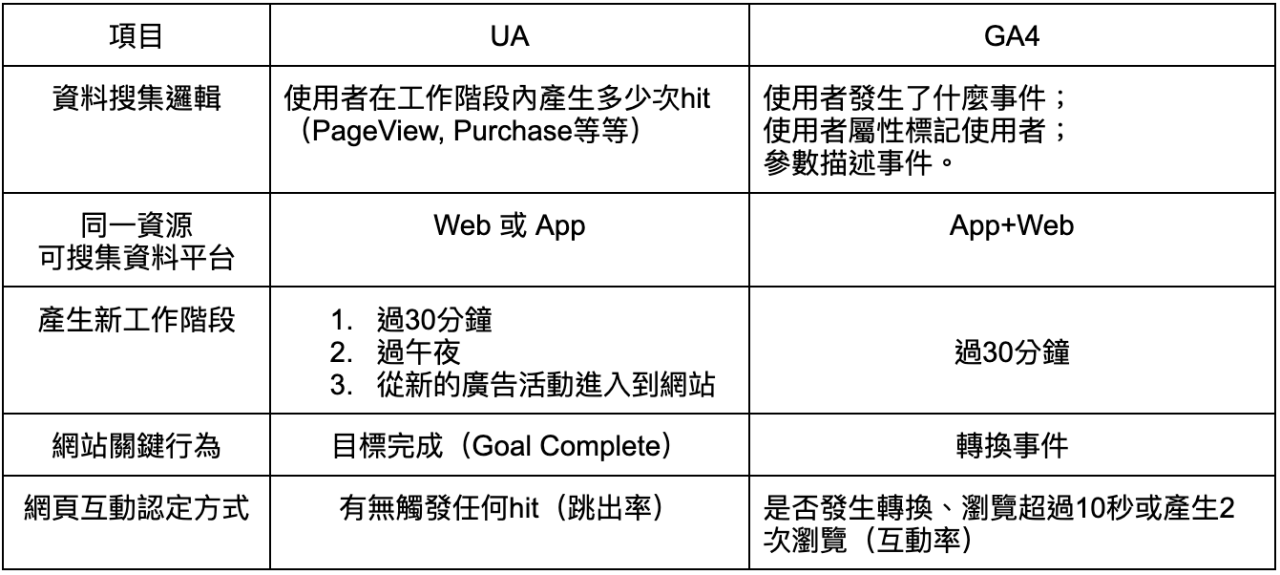
Most marketers will be familiar with these differences. But if you want to read UA data together with GA4, what do you need to watch for? The points below explain what to keep in mind when referring to historical UA data alongside GA4:
When reviewing data: check whether UA and GA4 data come from the same platform
Besides website data, GA4 can also collect app data into the same property. So when you look at UA website property data alongside GA4 website property data, check whether the GA4 data includes app data. If it does, filter out the app data so that you are comparing website data with website data.
When reviewing traffic: sessions are defined differently, so avoid comparing absolute values
Because UA and GA4 define sessions differently, many UA users looking at GA4 wonder why traffic seems to have dropped after switching. This is because the conditions that create a session in UA are different from those in GA4, which makes traffic appear lower. When interpreting traffic data, we recommend not comparing UA and GA4 traffic as absolute values. A better approach is to look over a longer period and use month-on-month or quarter-on-quarter percentage changes, or conversion rates, to judge whether a marketing strategy is working.
When reviewing page engagement: UA bounce rate and GA4 engagement rate are defined differently, so use other metrics too
As the table above shows, UA uses bounce rate to assess page engagement, while GA4 uses engagement rate. GA4 calculates bounce rate as (1 − engagement rate), which is a different definition from UA’s bounce rate. So when reviewing engagement for the same page, as well as comparing bounce rate and engagement rate, we recommend looking at other engagement-related data, such as clicks on interactive buttons and scroll depth percentage. Looking at engagement from several angles helps make sure your interpretation is heading in the right direction.
When reviewing key conversions: UA goals and GA4 conversions are set up differently, so check the conditions match
To check whether key actions on a website are being completed, UA lets you set up Goals in the admin interface. In GA4, you first add events to the website and then mark the key events as conversions. Marketers can usually set up UA Goals themselves, while GA4 events need an engineer to configure them in the website front end or in GTM. If UA goals and GA4 events were set up by different people, we recommend they align on whether the conditions are the same. Otherwise the data will not be interpreted accurately.
When reviewing performance: GA4 offers different attribution models, so check they match UA’s
UA’s standard reports use last non-direct click attribution, meaning results are credited to the last channel the user came from, ignoring direct visits. GA4 offers several attribution models, and the most widely used is the data-driven attribution (DDA) model. If you do not check whether the attribution methods match when evaluating performance on each platform, your interpretation may be off.
Summary
UA and GA4 are fundamentally different data platforms, and we do not recommend comparing absolute values between them. But the UA data marketers worked hard to build can still keep its value through data export (recommended reading: Universal Analytics is ending: keep your key data with CloudAD’s data preservation service). Historical data is useful when planning marketing strategy. Whether you are redesigning website content, optimising ad strategy or planning what articles to write for your website, historical data gives marketers a strong basis for insight.
If you would like help using your UA and GA4 data, get in touch.