Have you ever opened a Google Analytics 4 (GA4) report and been surprised to find Facebook, facebook and FB split into three different traffic sources? Or, just as a major campaign ended and you were about to analyse its performance, someone had entered a UTM parameter incorrectly, so the data could not be combined and ROI was hard to assess accurately?
In fact, the key to how GA4 knows which ad or platform a user came from is the UTM parameters in the URL. But in a fast-paced digital marketing environment, setting UTMs is often a challenge. Human error is not only common; it pollutes the data at the source and leads to poor marketing decisions.
That is why standardising UTMs is a key step in improving tracking accuracy and strengthening attribution analysis. CloudAD’s UTM smart tag builder helps marketing teams solve these problems in one go, ending data chaos and laying a solid foundation for accurate decisions.
Before introducing the tool, let’s look at the order in which GA4 determines traffic sources, and at the most common UTM setup mistakes.
How does GA4 determine traffic sources?
How does GA4, like a clever detective, work out exactly which link each visitor clicked to reach the website? The answer is that it has a clear set of rules applied in order of priority. GA4 checks the conditions one by one, starting with the highest priority. As soon as it finds a matching clue, it uses that source for attribution and stops checking.
The order is as follows:
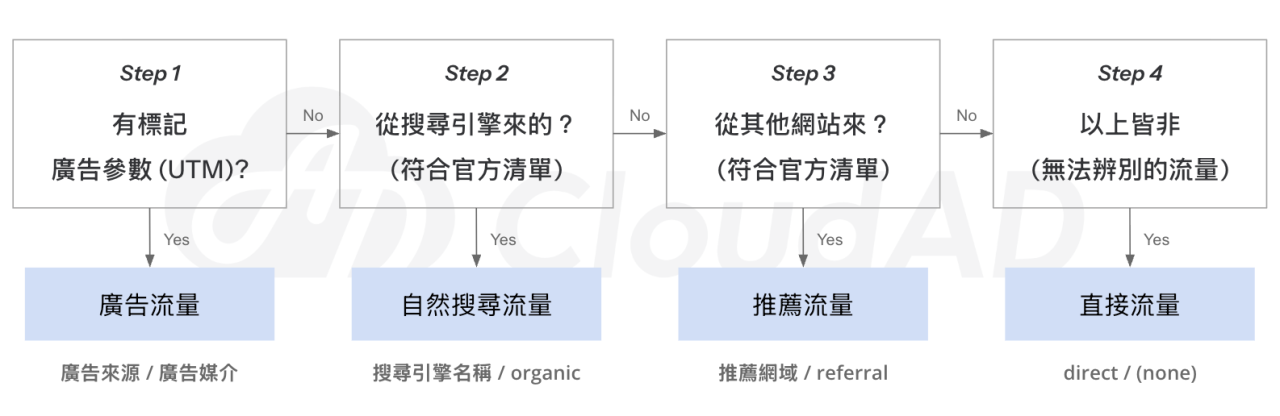
As the flowchart shows, UTM parameters set manually by marketers play a key role in traffic attribution. If something goes wrong at this step, GA4 cannot identify the traffic source correctly and will misclassify it as a referral link or Direct traffic, which ultimately distorts your report data.
Common UTM mistakes
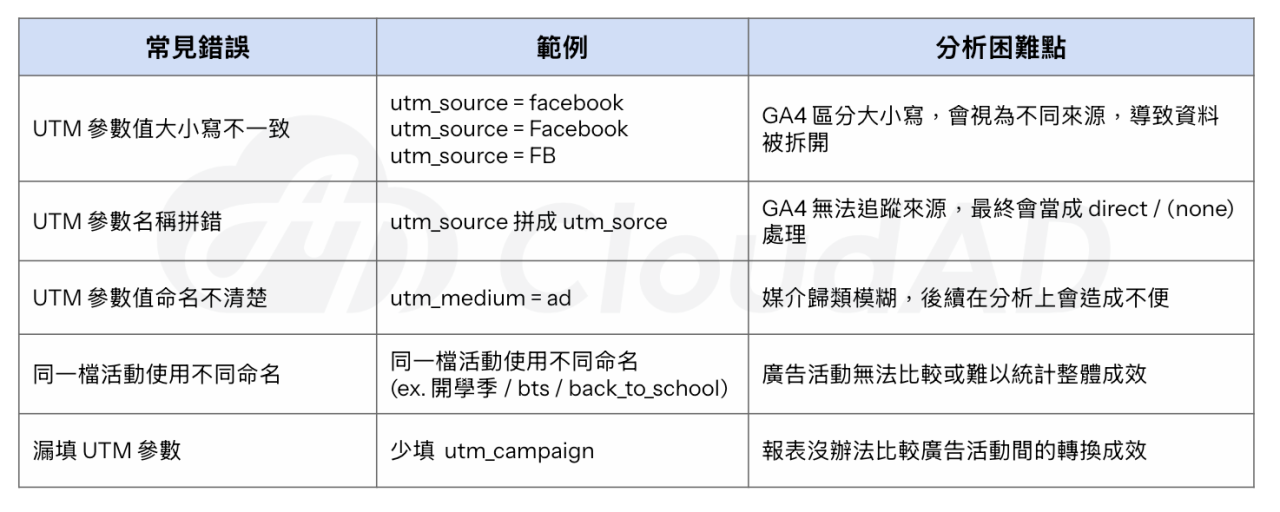
You can work hard analysing reports in GA4, but if the UTMs are not set up properly, data will still end up in the wrong place and affect the accuracy of your analysis. Based on past experience, CloudAD has listed the most common UTM problems to help teams avoid these data traps in advance.
The UTM smart tag builder: an end to human error
Without consistent naming rules, it is often impossible to tell different traffic sources and campaign results apart clearly, and you miss opportunities to optimise ad strategy and budget. Just as a factory uses an SOP to ensure product quality, campaign traffic tracking needs a standardised process to keep data accurate and consistent.
To solve this problem, we built the UTM smart tag builder, which offers three core benefits:
- Standardised UTM parameters: data is attributed correctly in GA4 and stays consistent no matter who sets it up
- AI assistance: describe the campaign in one sentence, and AI suggests suitable parameter names and estimates which channel GA4 will attribute the traffic to, making UTM naming more consistent and easier to analyse later
- A complete URL in one click: it automatically generates the full link with UTM parameters, ready to copy and use, fitting smoothly into your daily marketing workflow and greatly improving efficiency
Conclusion
From inconsistent capitalisation to unclear naming logic, UTM setup is full of traps. These seemingly small mistakes are often the root cause of inaccurate data and wasted marketing budget.
GA4 is a system that reads parameters automatically. A single letter in the wrong case or a single typo can skew an entire set of report data. That is why UTM setup must be consistent and accurate: it is the infrastructure of GA4 analysis.
By combining standardised naming rules with AI naming suggestions, CloudAD’s UTM builder turns tedious parameter setup into a simple, fast process that is less prone to error. Start now and give your marketing results a solid foundation.