
1. What are value rules?
In advertising, different audiences bring different business value. Meta’s value rules are a bid adjustment tool that lets you set rules based on audience age, gender, location, operating system and placement, and automatically raise or lower the bid for that ad.
2. Why use value rules?
The benefit of value rules is that you can concentrate your ad budget on the audiences that are more valuable to your business. They can:
- Improve ad efficiency: help the system put resources into the groups most worth reaching.
- Respond precisely to market differences: differences in age, location, device and placement can be reflected in your bids.
How to apply them
- By location
- Europe -10% (there may be relatively less stock to sell)
- United States +20% (enough stock and higher spending power)
- By age
- 25–34 +30% (strong spending power)
- 55–64 -10% (lower average order value)
- By gender
- Women +20% (possibly more likely to click)
- By operating system
- iOS +15%
- By placement
- Instagram +20% (good engagement)
- Audience Network -10%
Based on these examples, which industries are particularly suited to value rules?
- E-commerce: order values differ by age and device.
- Gaming: spending differs between iOS and Android users.
- Cross-border markets: spending power differs by region.
3. How to set up value rules in Meta Ads Manager
1. Go to Ads Manager and find value rules:
In the left navigation bar, open Advertising settings and click Value rules.

2. Create a rule set:
Click Create rule set Create.
3. Set up the first rule
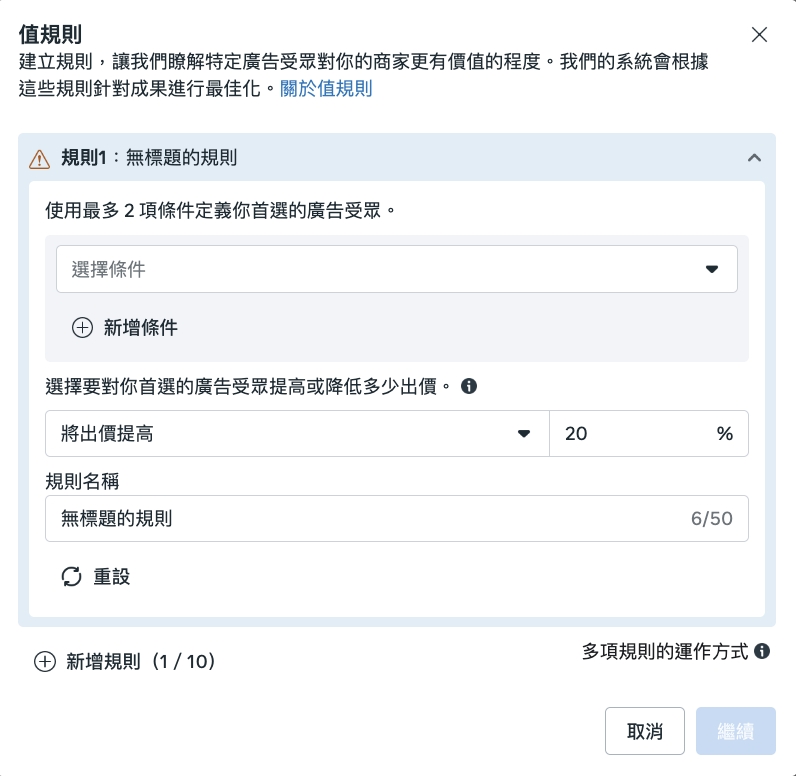
- Choose conditions (up to two).
- Conditions include age, gender, location, operating system and placement.
- Choose to “increase” or “decrease” the bid and enter a percentage (for example +20% or -10%).
- Name the rule.
4. Add more rules (optional)
Each rule set can contain up to 10 rules.
5. Change the rule order
Click Change priority to adjust the order in which rules are applied.
If a user matches more than one rule, only the rule with the highest priority in the list is applied.
6. Review and save
Click Next, check the rule set summary, and click Save once everything is correct.
4. How to apply value rules to a campaign
Once you have set up a rule set, you still need to apply it in a campaign for it to take effect. The process is as follows:
1. Create a new campaign in Ads Manager (value rules are now available for all campaign objectives and most conversion locations).
2. When creating the ad set, choose the rule set to apply in the Value rules section.

3. Set your ad audience (we recommend keeping it broad to avoid conflicts with the value rules).
4. Finish setting up your ad creative and publish the campaign.
Once done, your ads will automatically adjust bids for the specified audiences according to your rules. After the ads start spending, you can use the value rules report to view the data and interpret the results.
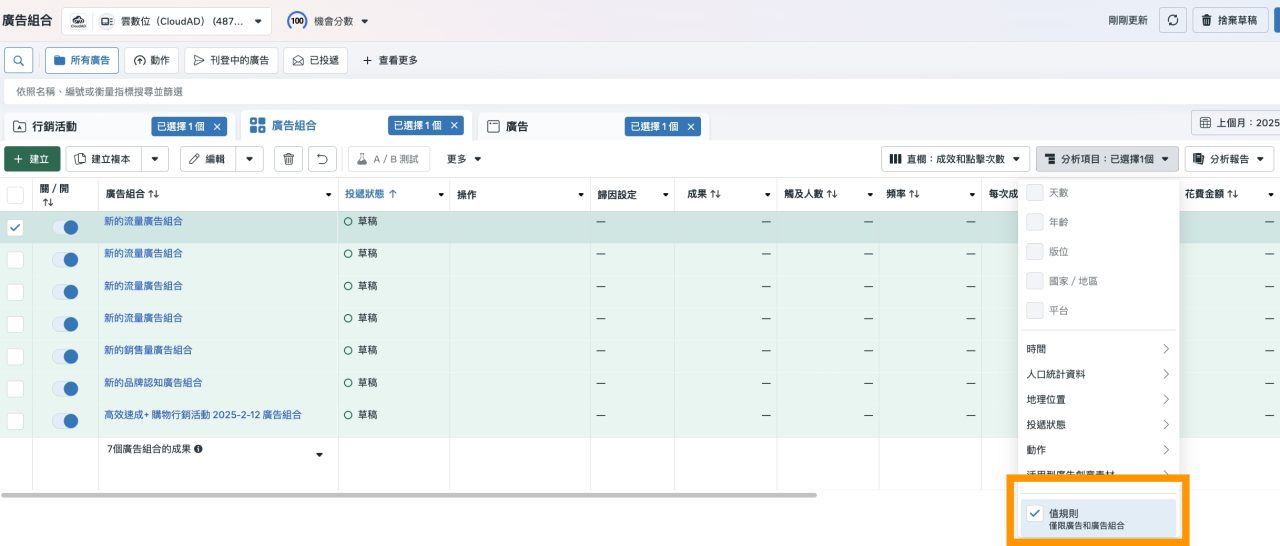
5. Frequently asked questions
Q: If a user matches the conditions of more than one value rule, how does the system decide?
A: The system only applies the first applicable rule in the list. For example:
- Rule 1: increase bids by 20% for women in California
- Rule 2: increase bids by 10% for women on iOS
If a woman matches both rules, rule 1 is applied and the bid is increased by 20%.
Q: Will editing value rules put my campaigns back into the learning phase?
A: No. Editing value rules no longer triggers the learning phase.
Q: I went into Ads Manager but can’t find anywhere to set value rules. Why?
A: According to Meta’s official announcement, value rules will be available to 100% of advertisers from 30 September 2025. If you don’t see the option yet, the feature has not been rolled out to you.