Is Google AI Max a new ad type?
AI Max is not a new campaign type. It is a one-click AI enhancement for Search campaigns. So the right way to think about it is “I turned on AI Max in my Search campaign”, not “I am running an AI Max campaign”.
What are the benefits of Google AI Max?
By turning on AI Max in an existing Search campaign, you upgrade your ads with three core capabilities at once:
- Match expansion
You are no longer limited to the keywords you set. AI expands to new, high-potential queries based on search intent, so you can reach the right people even with terms you didn’t bid on. - AI-generated creative assets
AI automatically adjusts headlines and descriptions based on the user’s query and your website content, so the ad better matches what the searcher needs. - Final URL expansion
Based on what the user searched for, it automatically sends them to the most relevant page on your website rather than a fixed landing page, improving conversion efficiency.
Most importantly, Google’s official test data shows that after turning on AI Max, overall conversion performance for Search campaigns improves by 14% on average.
How to set up Google AI Max
As mentioned above, AI Max is an enhancement within Search campaigns, so to set it up you need to create a Search campaign in Google Ads.
AI Max can currently be set at two levels: campaign and ad group.
1. Campaign level
Follow the setup steps until you reach the “AI Max” tab, then turn on “Optimise campaign with AI Max”.
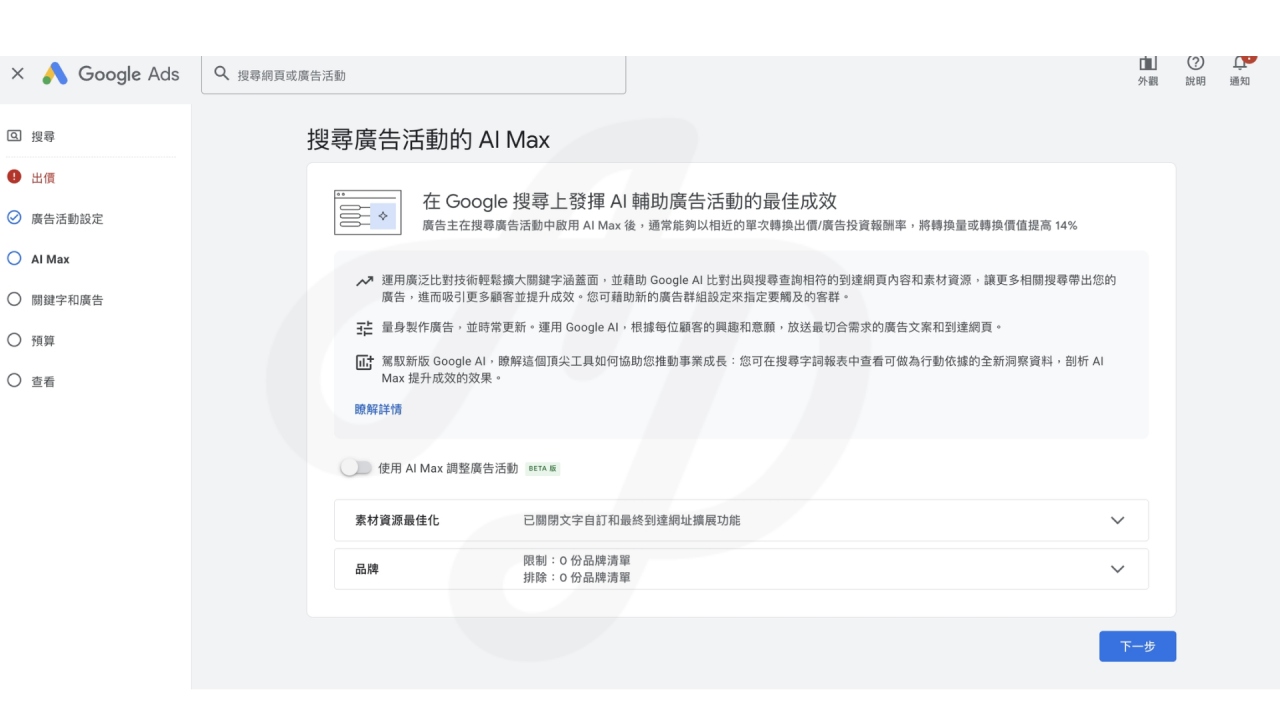
The settings available are as follows:
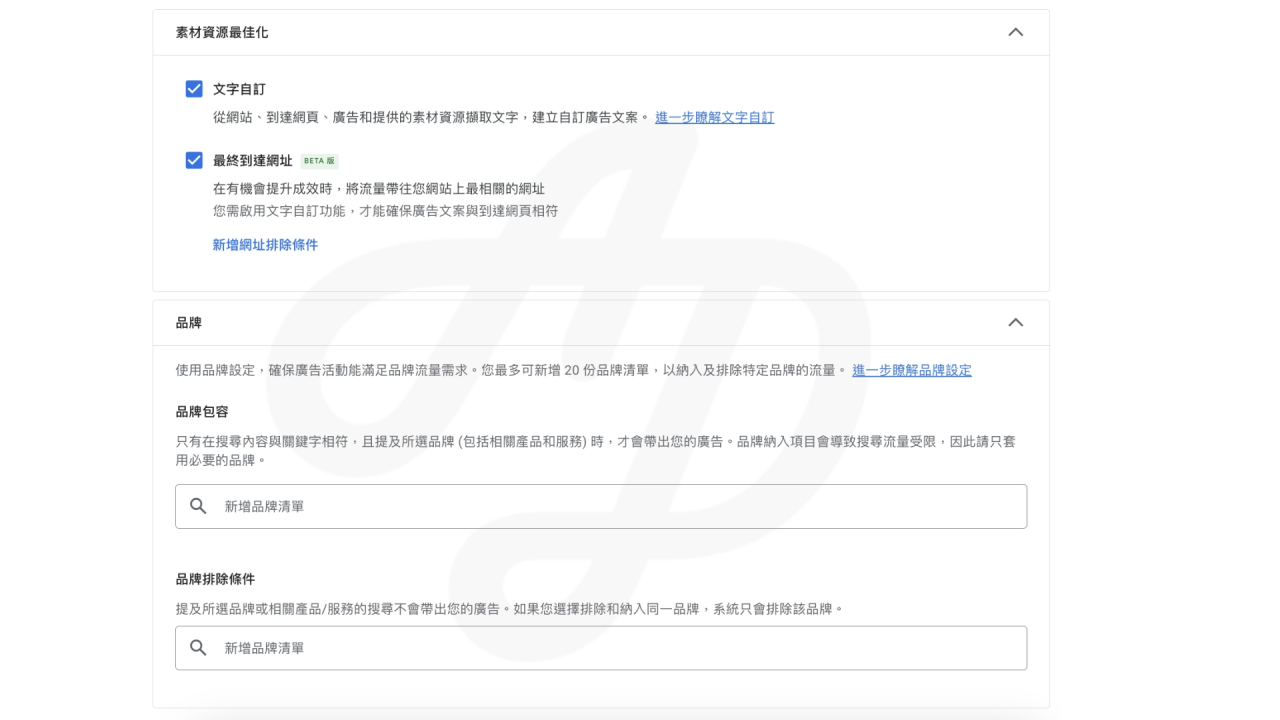
- Asset optimisation
- Text customisation: creates customised ad copy using text taken from your website, landing pages, ads and the assets you provide.
July 2025: according to Google’s official information, the languages currently supported are English, Spanish, Portuguese, Italian, French, German, Japanese and Dutch. - Final URL: when there is a chance to improve performance, sends traffic to the most relevant URL on your website.
This means the ad’s final landing page may be outside the URL you set. If you only want to link to a fixed page, we recommend turning this off.
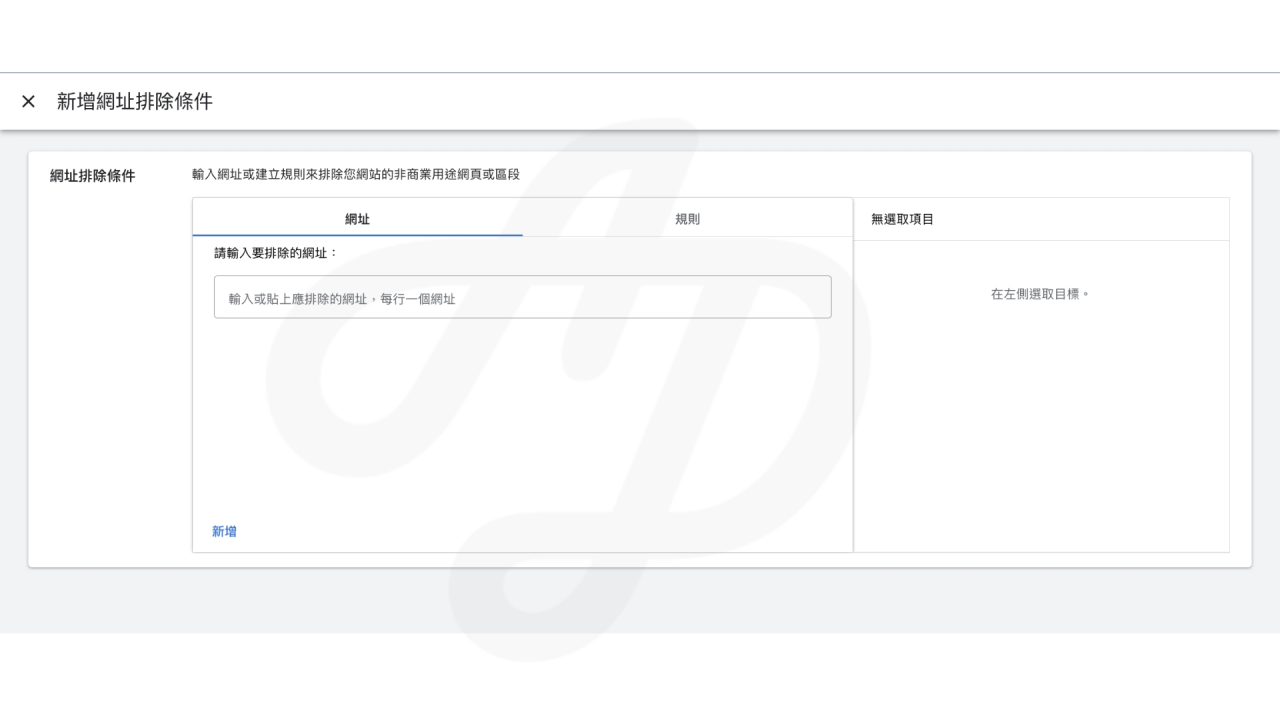
(Note 1: if there are URLs on your site you don’t want used as landing pages, you can set them under “Add URL exclusions”.)
(Note 2: text customisation must be turned on to make sure the ad copy matches the landing page.)
- Text customisation: creates customised ad copy using text taken from your website, landing pages, ads and the assets you provide.
- Brands
- Use brand settings to make sure your campaign meets your brand traffic needs. You can add up to 20 brand lists to include or exclude traffic for specific brands. This is useful whether you are advertising on competitor keywords or related services.
(Note: if the brand you want is not in the system, a review request takes 4 to 6 weeks. If approved, the brand will be added to the Google Ads brand library.)
- Use brand settings to make sure your campaign meets your brand traffic needs. You can add up to 20 brand lists to include or exclude traffic for specific brands. This is useful whether you are advertising on competitor keywords or related services.
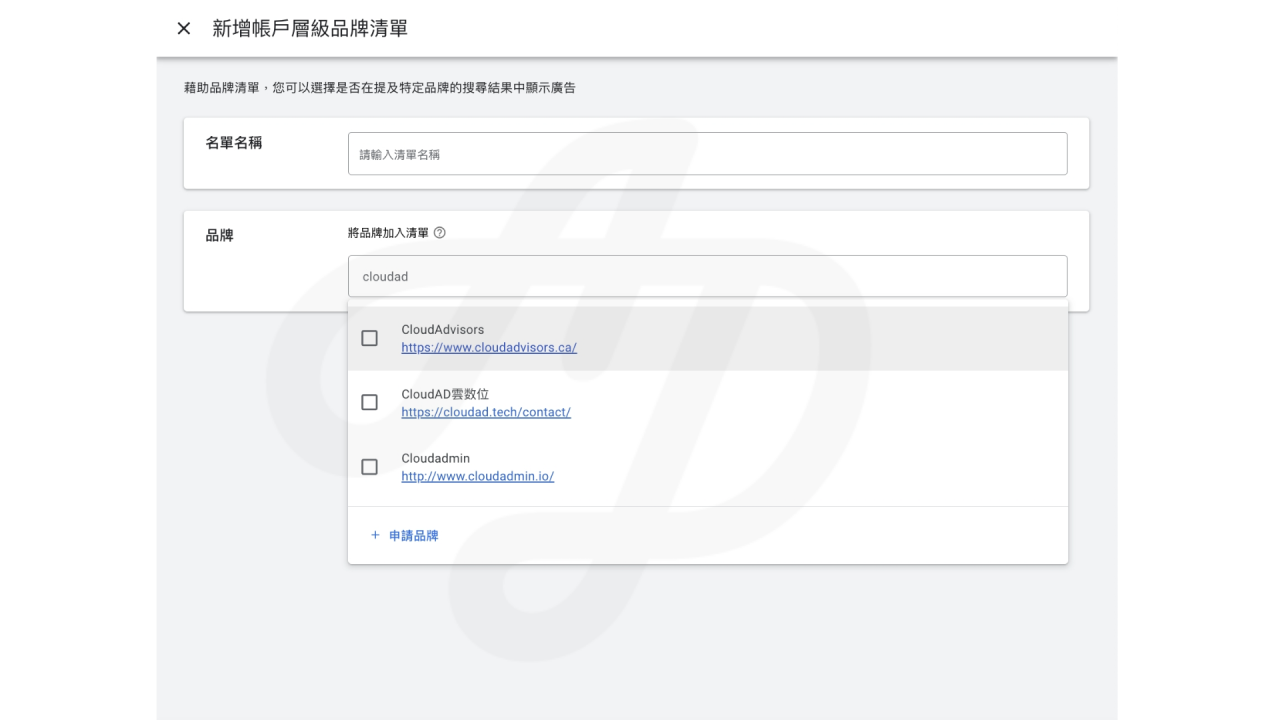
- Brand inclusions: your ads will only show when the search matches your keywords and mentions the selected brands (including related products and services). Brand inclusions limit search traffic, so apply only the brands you need.
- Brand exclusions: your ads will not show for searches that mention the selected brands or related products or services. If you choose to both exclude and include the same brand, the system will only exclude it.
2. Ad group level
Next, in the “Keywords and ads” step you will see a second “AI Max” option. Click it to see the following screen:
(Note: you need to turn on AI Max at campaign level in the previous step before you can set it here.)
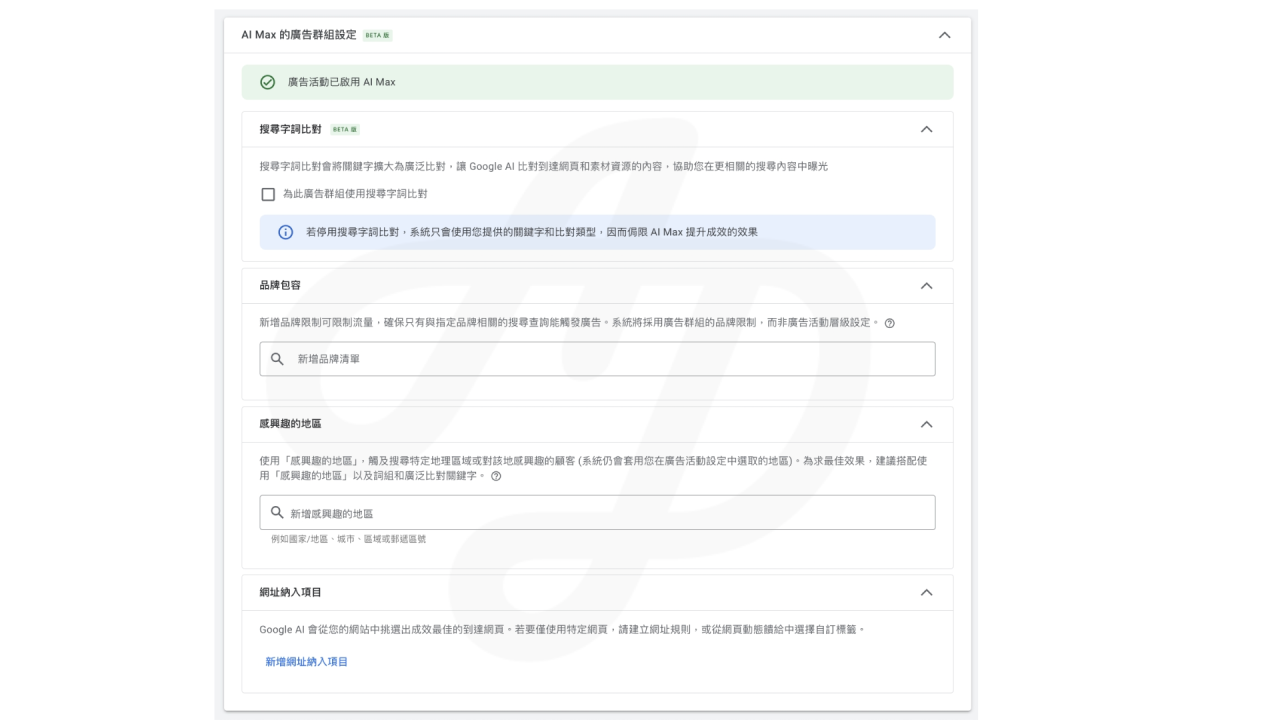
The settings available are as follows:
- Search term matching: expands your keywords to broad match and lets Google AI match against the content of your landing pages and assets, helping you appear in more relevant searches.
If you turn on AI Max, we recommend turning on search term matching. If it is off, the system will only use the keywords and match types you provide, limiting how much AI Max can improve performance. - Brand inclusions: the same as the campaign-level brand inclusions above, but set at ad group level. Your ads will only show when the search matches your keywords and mentions the selected brands (including related products and services). Brand inclusions limit search traffic, so apply only the brands you need.
- Locations of interest: even without a keyword match, your ads can be shown to reach specific customers based on their location intent. This reaches customers searching for, or interested in, a specific geographic area (the locations selected in your campaign settings still apply).
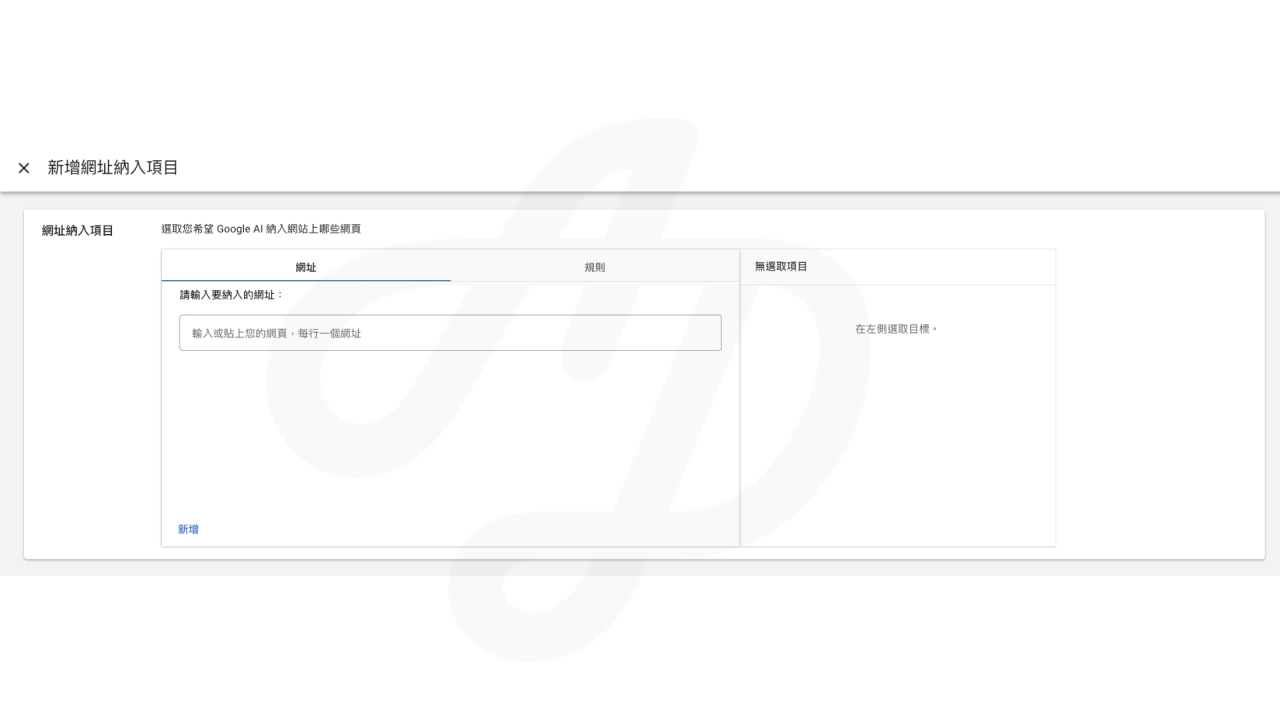
- URL inclusions: to use only specific pages, create URL rules or choose custom labels from a page feed, which also covers URLs that final URL expansion did not pick up.
Google AI Max: frequently asked questions
Q: Apart from the different ad settings, what will I see in reports if I turn on AI Max?
A: AI Max improves several reporting features to help you track campaign performance effectively.
- Search terms report: a new “AI Max” match type for incremental search terms, and a new source column showing whether the match came from broad match expansion or keywordless matching.
- A new view that brings together search terms, ad headlines and URLs, so you can see the full path of customer interaction with your ads at a glance
- Keywords report: a new “AI Max” summary row showing AI Max’s overall contribution
- Landing pages report: a new “Selected by” column showing the performance of AI Max landing pages
- Assets report: shows the performance of AI Max assets
Q: Does AI Max apply the negative keywords I specify?
A: Yes. Even with AI Max turned on, the system still applies the negative keywords you specify.
Q: Does AI Max support Google Ads Editor or the API?
A: The API and Editor do not yet support AI Max, so when you turn AI Max on or off, API requests that manage text customisation and brand settings in the campaign may produce errors. Let the relevant teams know before turning it on or off.
*Editor and API support is expected in the second half of 2025.