Google Analytics 4 (GA4) has officially arrived. Many brands have finished their implementation, but we believe even more businesses are still setting it up, or are only just getting started. How can latecomers catch up quickly?
There’s a well-known saying inside CloudAD: “Get events right, and GA holds no worries.” GA4 runs on events. Events are what allow it to map out user behaviour and build a sound data foundation, which can then be applied widely in CRM, MarTech and AI machine learning. So understanding how events are structured and what they mean, and even checking whether they have been implemented correctly, is an essential part of any business’s move to GA4.
As a MarTech partner certified by Google to sell GA360, CloudAD introduces events for advertisers below and, for a limited time, is also offering its own event health check report.
1. What is an event
An event is a specific user interaction on a website or app that GA4 tracks and records. Events can be many different actions, such as clicking a button, filling in a form, watching a video or triggering a specific action. By setting up events, you can understand how users behave on your website or app, improve the user experience, optimise your site or app’s features, and build more effective marketing strategies.
2. The four types of events
With a basic understanding of what events are for, it helps to know that Google divides events into four types, based on how they are collected and defined: automatically collected events, Enhanced measurement events, recommended events and custom events.
- Automatically collected events: events the system collects by default once you’ve set up GA4 on your website. They are triggered when users have basic interactions with your app and/or website, and you don’t need to write any extra code to collect them.

- Enhanced measurement events: these can be seen as an extension of automatically collected events. They are easy to turn on and need no code changes: simply enable Enhanced measurement once GA4 is set up and events are collected straight away. Enhanced measurement events include basic events needed to review user behaviour, such as page views and clicks. Once GA4 is set up, we strongly recommend enabling it at the same time so your data is collected in full.

The following types of events only appear in Analytics once they have been implemented:
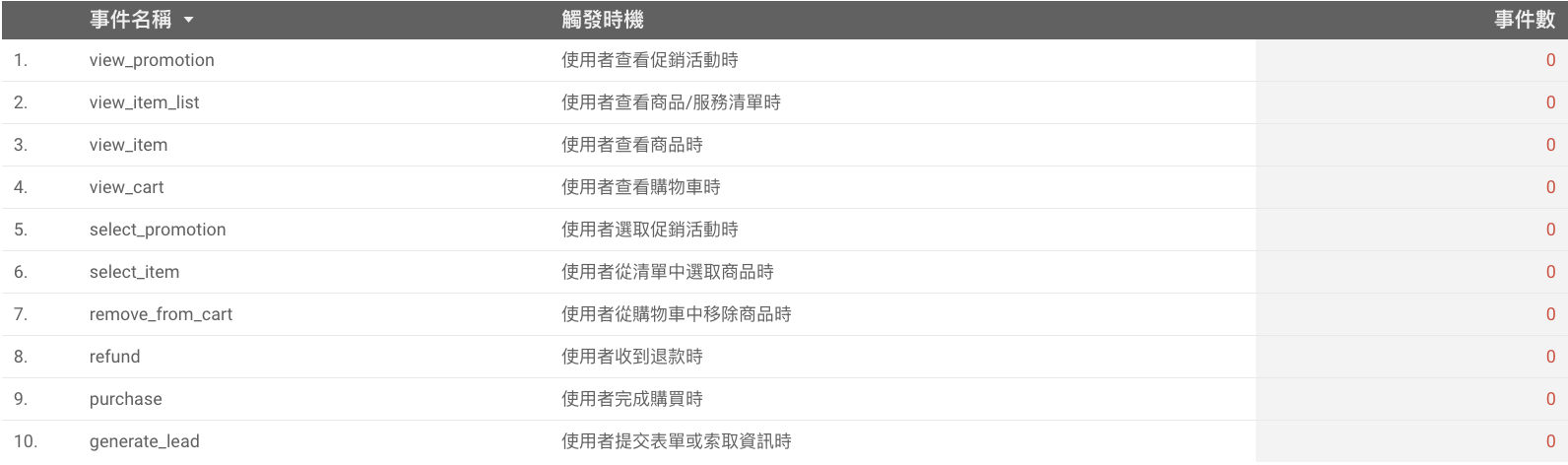
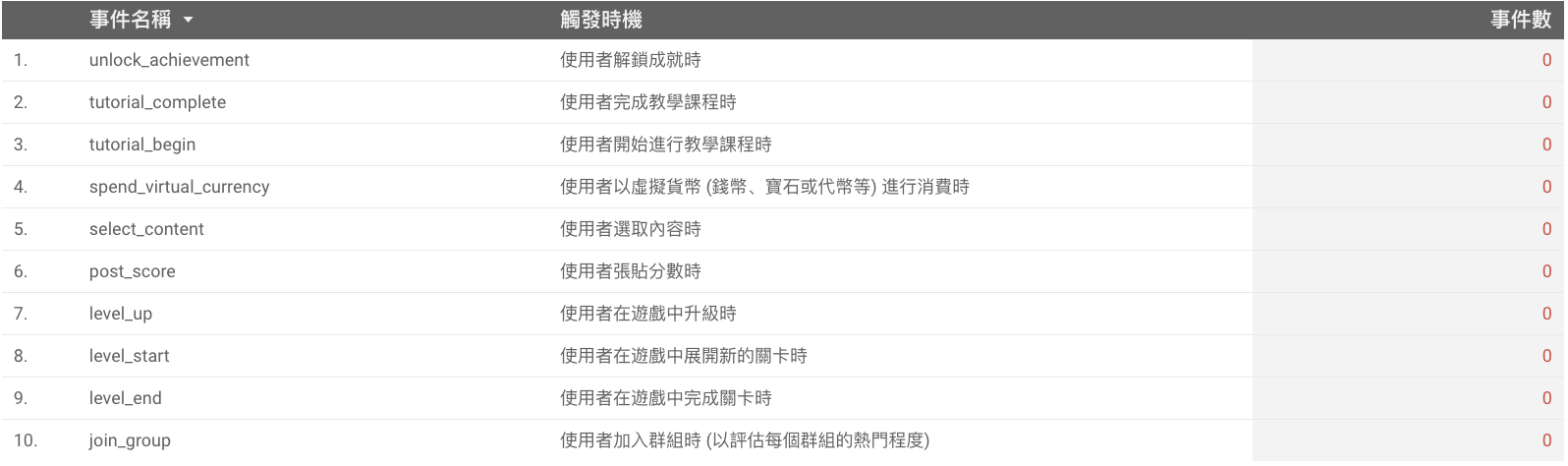
- Recommended events: events you implement yourself, with predefined names and parameters. Once implemented, you can use existing reporting features and those released in future. Google provides these for different industries and uses, and you choose whether to implement them. They include recommended events for two main types of website, online sales and games. If your website is neither, there are also recommended events for general use. We suggest assessing your data needs and including them as a reference in your implementation.
- Online sales
- Games
- General

- Custom events: events you define yourself, tailored to your internal needs. You can create custom dimensions or metrics from event parameters, then add them to custom reports, audiences, explorations and segments, or use them as secondary dimensions in standard reports, to get deeper and more meaningful analysis. At the end of this post CloudAD provides its own report so you can quickly check whether your events have been implemented successfully. Below are some points to note about custom events, to help you avoid wasted effort and speed up your implementation.
- If you have implemented your own custom events, they will appear in the relevant section of the report. (If not, it will show “No data”.)
- We recommend using a standard naming convention and keeping a record, so events are easy to manage and understand.
- When setting up custom events, follow these naming rules so GA4 can record them:
– Don’t use reserved prefixes and event names
– Event names must start with a letter
– Use only letters, numbers and underscores, with no spaces
– Names are case-sensitive
– Event names can be up to 40 single-byte characters. If an event name is longer than 40 single-byte characters, it can’t be counted as a conversion (if the event is marked as a conversion)

Now you understand events and why they matter in GA4, but are you unsure whether your event-based GA4 is correctly collecting the event data you need, so you can analyse your website data accurately and run your business more effectively? With this report, simply choose a GA4 property and a date range to see how every event on your website is being collected.
The report sorts events into the four types, helping you quickly understand:
– Where does each kind of event data come from?
– Are the events you should have being collected?
– Which events would be worth collecting but haven’t been implemented yet?
– Which events are being collected but need adjusting and optimising?
– Where event collection may be abnormal, what should be checked further?
The report helps you understand your GA4 setup better and improve it, so GA4 can deliver more value.
- Get the report: bit.ly/44q0hku
3. CloudAD’s own health check report
Still curious about the digital world? Want to upgrade your data foundation faster? Or have any marketing needs on your data journey? Get in touch and work out the next step with CloudAD.