GA4 effectively brings together users’ behaviour across web and app, and works well with a brand’s first-party data for integration and analysis. That has made it an important source of data insight for many brands. But while GA4 is highly flexible, the free version still has limits and can’t meet every analysis scenario or purpose. If your brand has any of the following needs, GA4 360 is a good choice.
- High traffic and data volumes across the brand’s websites and apps
Brand analysis relies on complete data. But GA4’s limits, from custom dimensions and metrics and sampling of events in Explorations to the number of events that can be exported to BigQuery each day, fall below what the brand needs, making effective analysis impossible. - Large groups with many brands, or organisations with many team levels
To consolidate data from the brands it owns, a group needs to bring it together in one environment for unified analysis and management, while still giving each brand the flexibility to manage itself. The account structure of free, standard GA4, however, makes it hard to divide governance of properties effectively. - Brands with many products and multiple websites and apps
The brand sells through a range of channels, including several apps and websites, and needs to integrate this data for analysis and use. - Large amounts of first-party data
The brand has a large membership base or many first-party data systems, such as POS sales records, CRM membership data or a CDP. Because GA4 can integrate a wide range of data, the brand wants to use it to combine first-party data with digital behaviour, analyse consumer behaviour and optimise the direction of its marketing strategy.
From GA4 to GA4 360: the differences explained
Google Analytics 360 is part of Google Marketing Platform. Once you sign a contract with a GA360 reseller, you can upgrade your GA4 property to GA4 360.
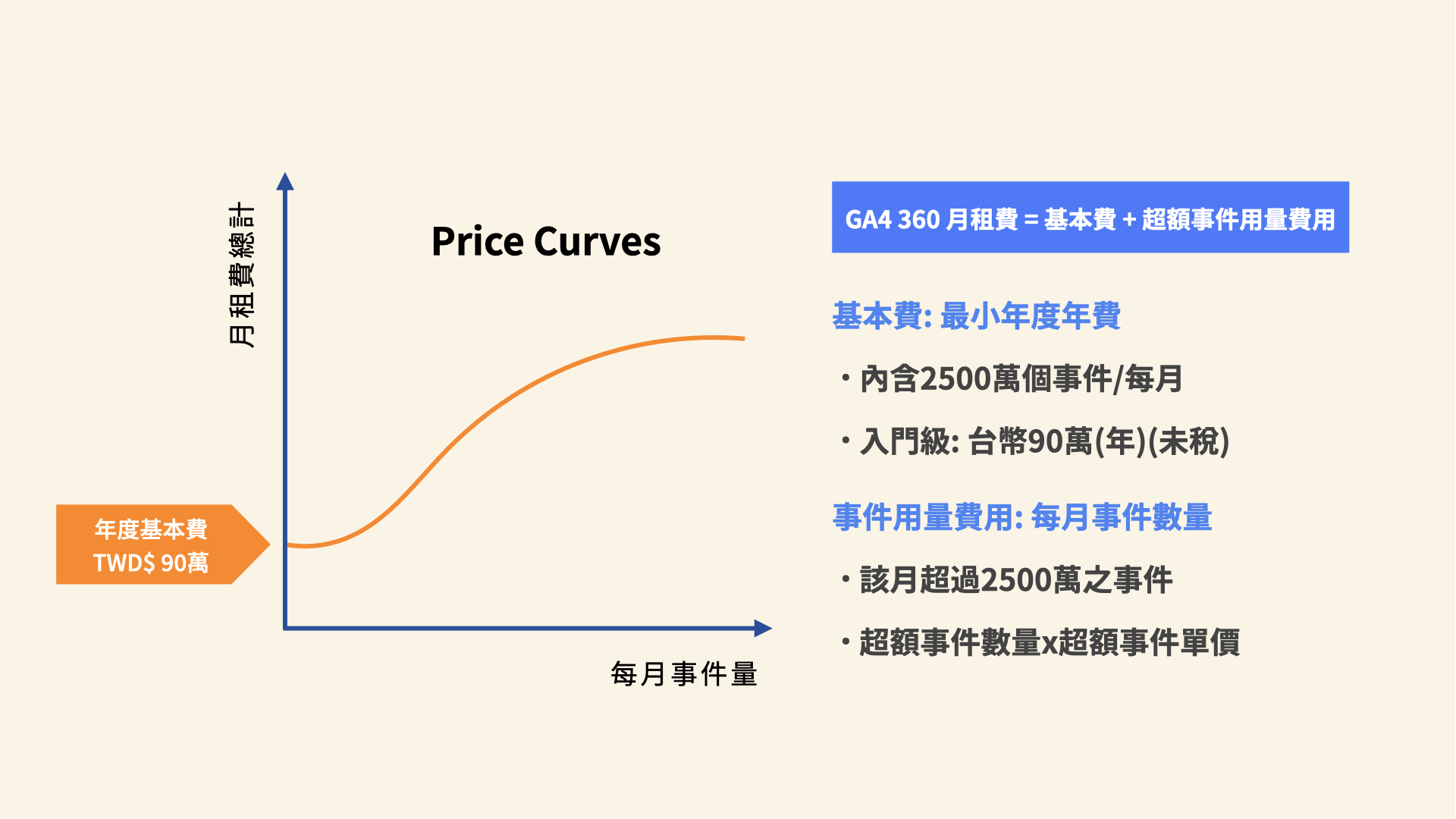
GA4 360 can be seen as the premium version of GA4, with more advanced features and higher data limits, for example on data sampling in Explorations, the number of events exported to BigQuery each day, custom dimensions and metrics, audiences, data retention and Reporting API quotas. Details below:
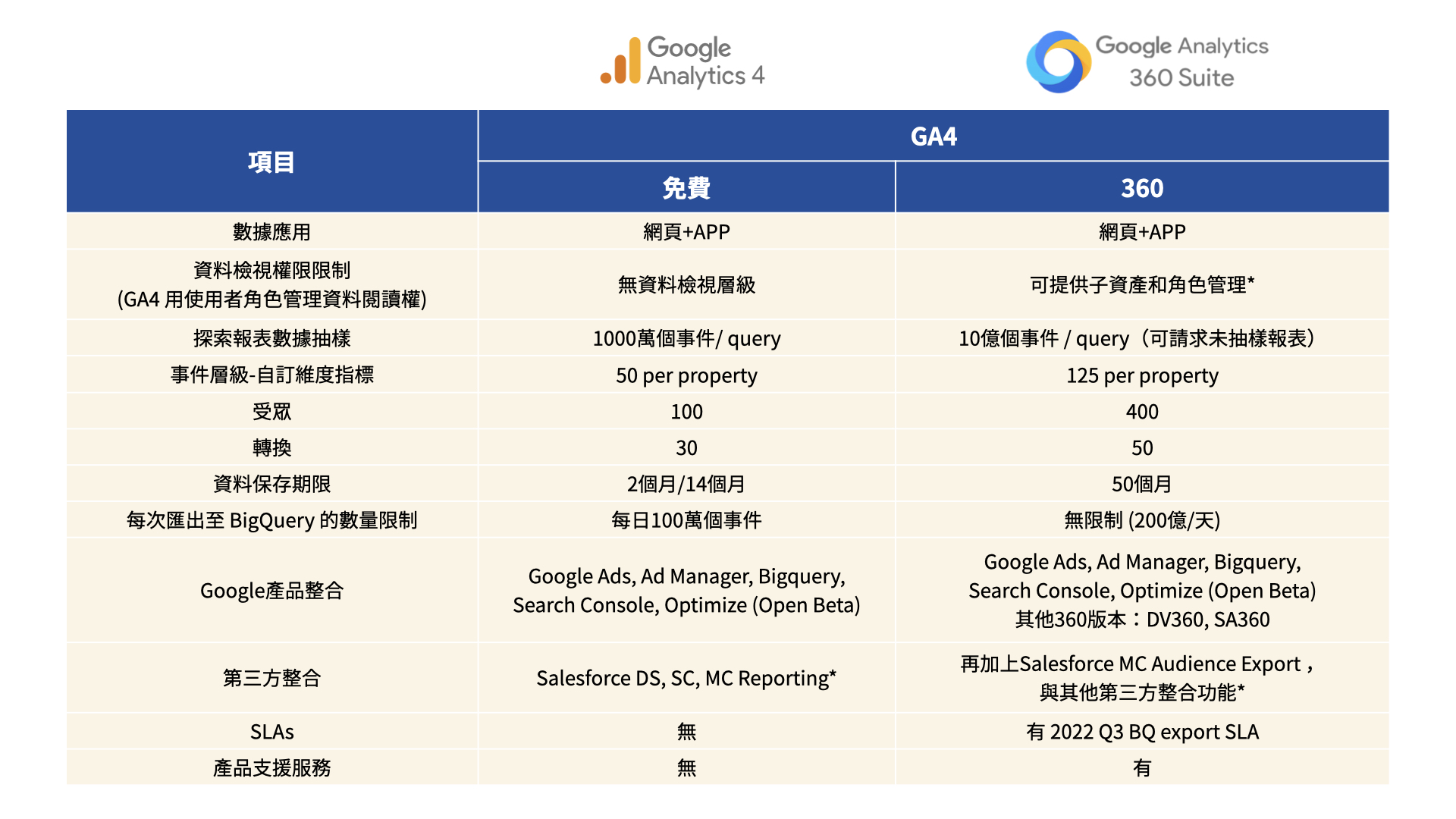
- Data limits: free, standard GA4 has relatively low limits, for example 50 custom dimensions and 100 audiences per property, and only 1 million events a day can be exported to BigQuery. GA4 360’s limits are higher: for example, each property can have 125 event-scoped custom dimensions and 400 audiences, and the number of events that can be exported to BigQuery each day rises sharply, into the billions (check Google’s latest official documentation for the actual limits).
- Data retention: in GA4 Explorations, the maximum date range in the free, standard version is 14 months, while GA4 360 extends this to 50 months, so year-on-year needs can be met with GA4’s own features.
Brands that often use Data Studio dashboards, or that need the Google Analytics Reporting API for access-controlled views or real-time data analysis, can easily run into significant limits. GA4 360 has much larger quotas, so it can meet a brand’s larger-scale and real-time needs.
GA4 360 enables data governance and more flexible access across the organisation
With GA3, brands could assign “Views” so that different Google accounts (different people) could see different data. GA4’s account structure is different from GA3 and has no view level. If a brand needs to separate who can see which data, it has to use GA4 360 to create virtual properties called subproperties, then grant each subproperty to the accounts that need access. For example, a brand that has created a property can create subproperties for different departments and partner agencies, giving specific users access to specific areas of data. This gives flexibility in how data governance is divided.
When an organisation has several GA4 properties, it can also use roll-up properties to combine them into a single property. There is no need to set up or tag anything again, and you can see how multiple GA4 properties are performing from a high-level view. For example, a group with GA4 properties for subsidiaries in several regions can combine them into a single property to see the company’s overall performance and trends on a given metric.
Both subproperties and roll-up properties can be linked independently to Google products such as Google Ads and BigQuery, making data analysis and marketing use easier for brands.
Implementing GA4 360 with CloudAD as your partner
CloudAD has a highly professional data consulting team and extensive experience with GA4 implementation and GA360 services. For brands ranging from small and medium-sized businesses to multinational companies, we provide tailored technical support and consulting based on each brand’s needs. CloudAD helps you get your data in order, steer your brand through data turbulence and turn data into decisions. Get in touch.